


Oticon Companion
4.12.13K Reviews
App Specs
- Version
- 1.8.0
- Updated On
- License
- Free
- Downloads
- 1,000,000+
- Developer
- Oticon A/S
- Categories
- Medical
- Platform
- Android, iOS
Screenshots
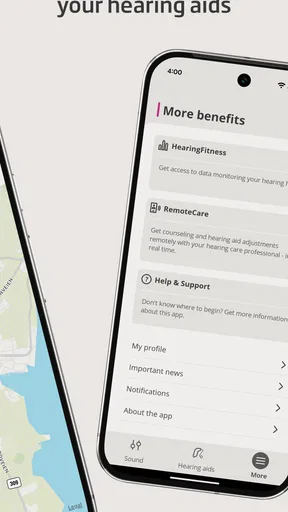
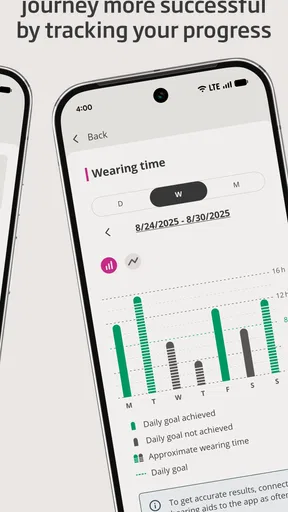
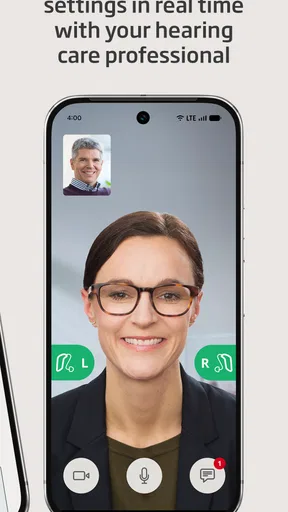
 Analysis by AppCompare
When I start using a hearing-aid control app, I want to solve a practical problem: make an adjustment without drawing attention to myself or fumbling with a small device. Oticon Companion is a free medical app from Oticon A/S for people who use compatible Oticon hearing aids. It is rated for Everyone, has a 4.2 average from around 16,000 ratings, and has been installed over a million times. Those figures suggest it has reached many users, but the useful question is whether it fits the way you handle hearing support from morning to evening.
Before you reach for the phone
The app makes most sense as part of a hearing-aid routine, not as a substitute for the hearing aids themselves or for professional fitting. Before relying on it while out and about, I would pair the aids and explore the controls at home, where a connection delay is less disruptive. That small bit of preparation helps you learn where the volume and program controls sit, and what a change feels like, before you need to make one in the middle of a conversation.
It is particularly useful if you already use Oticon hearing aids and want a discreet way to manage them. If you are choosing hearing aids from scratch, though, the app alone should not decide the purchase: its value depends on having compatible Oticon devices, and a phone interface cannot replace advice about fitting or hearing needs. The current version is 1.7.2 and requires Android 8.0 or later; iOS users can also use the app. That makes it a practical control option for many existing users, rather than a universal hearing tool.
First Impressions
From the get-go, the Oticon Companion app looks sleek and user-friendly. The interface is intuitive, with large icons and clear labels that make navigation a breeze. Even if you're not particularly tech-savvy, you won’t need to spend hours deciphering how to use it. The app is available for both Android and iOS, so no worries about compatibility issues if you switch devices.
Key Features
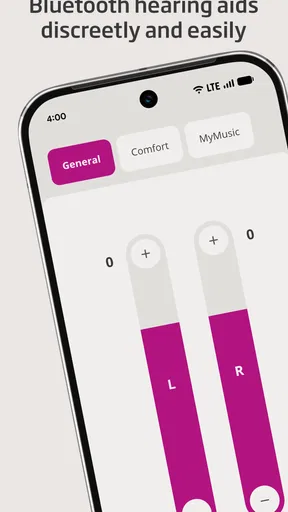
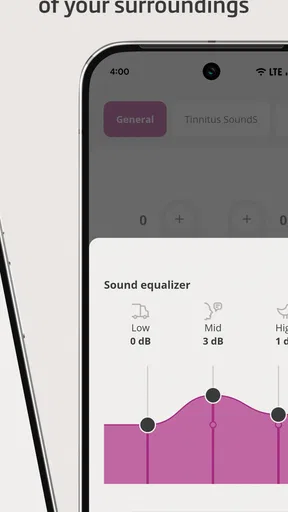
The app is packed with a range of features designed to enhance your hearing experience. One standout is the ability to adjust the volume and program settings of your hearing aids directly from your smartphone. No more fiddling with tiny buttons on the devices themselves!
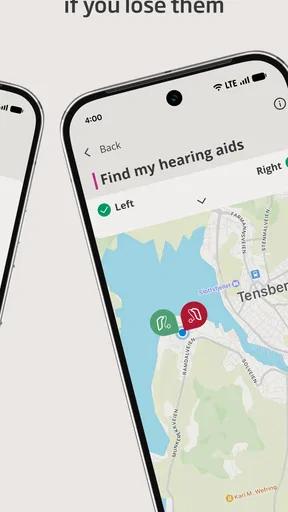
Another cool feature is the Find My Hearing Aids option. If you’re anything like me and prone to misplacing things, this feature is a lifesaver. It uses GPS to track where your hearing aids are, saving you from tearing your house apart.
The app also offers personalized sound settings. You can create custom profiles for different environments, whether you're at a bustling restaurant or relaxing at home. This personalization is a game-changer, allowing you to fine-tune your hearing to fit your lifestyle.
Worth Reading Before You Choose

Flipboard Shows What News Apps Must Do Beyond the Feed

Switching to Android Auto Means Rethinking Your Driving Routine

Google Calendar Makes a Crowded Week Easier to Manage

Ludo King Makes the Most of the Minutes Between Plans

Baby Panda World Brings Quick Play to Modern Phones, but Its Game Library Feels Busy

ESPN’s Live Game View Makes Following Close Games Easier
Turning an adjustment into an everyday routine
Here is where I find the phone control most useful: I can make a small change when the listening situation shifts, then give myself a moment to judge whether it actually helped. Imagine arriving at a café and finding that the table is noisier than expected. Rather than repeatedly changing settings while someone is speaking, I would make one adjustment during a pause, listen for a little while, and keep it only if conversation becomes more comfortable. The point is not to chase perfect sound every minute; it is to have a discreet option when a real change in surroundings calls for one.
Custom sound profiles can also make transitions less fiddly. If you often move between familiar settings, such as home and a busy public place, it is worth setting up and naming useful choices before you need them. That way, you are not trying to remember which adjustment worked last time while standing in a queue. I would still treat these as personal preferences rather than universal presets: a setting that feels good in one restaurant may not suit another room, and comfort can change with the people and noise around you.
For a less obvious but useful habit, make adjustments one at a time and notice what changed. If you alter volume and switch programs together, it can be harder to tell which action made the biggest difference. A simple mental note—“this is clearer for one person nearby, but not for the whole room”—can help you choose more confidently next time. The app gives you convenient access to controls; it does not remove the value of learning how your own hearing aids respond.
Everyday Use
In day-to-day use, the app proves to be reliable and efficient. The Bluetooth connectivity is generally stable, and changes made in the app reflect almost instantly in the hearing aids. There are occasional hiccups, like slight delays in connection, but these are minor and infrequent.
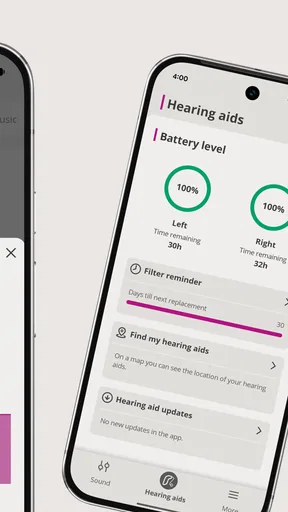
Battery life is another thing users often worry about with Bluetooth-connected devices. Fortunately, the app includes a battery status indicator, so you're never caught off guard with a dead hearing aid battery.
That said, I would not make the phone the only way I know how to manage my hearing aids. A connection can take a moment, and there may be days when reaching for a device control or using the aids’ familiar behavior is simply quicker. If a change does not appear to take effect, I would pause, check that the aids are connected, and avoid tapping repeatedly; multiple quick commands make it harder to tell whether the first one worked. This is a modest bit of friction, but it matters when you are trying to follow a fast conversation.
The battery indicator is best treated as a planning aid, not a guarantee that you can ignore charging or battery routines. Checking it before leaving home can help you decide whether to bring what you normally need for your hearing aids. It is especially handy before a long outing, when noticing a low charge only after you have settled into a meeting or meal would be inconvenient.
When the phone is not the best handoff
The app sits between you and the hearing aids, so the handoff depends on both the phone connection and the devices being available. In a quiet room, that is an easy exchange: open the controls, make a considered adjustment, and return attention to what you were doing. In a crowded place, looking down at a screen can itself interrupt the conversation. I would make a quick change only when needed, then put the phone away rather than turning every listening moment into a settings session.
There is also a practical difference between changing sound for comfort and solving a problem with the fit or performance of a hearing aid. If one ear suddenly seems much quieter, or an adjustment does not behave as expected, repeatedly changing programs is unlikely to be the best next step. The app is a control surface, not a diagnosis. For persistent issues, I would use the support route associated with my hearing care rather than treating the phone as a repair tool.
Compared with basic controls built into a hearing aid, a smartphone can offer a larger, more legible place to make changes and a convenient view of battery status. Compared with a general audio or accessibility setting on a phone, this app is specifically meant to manage Oticon hearing aids. That focus is a strength for Oticon users, but also its boundary: someone using another brand, or someone who wants a hearing app without hearing aids, should look elsewhere rather than expecting this one to work as a universal solution.
Design and Usability
The design of the app is modern and aesthetically pleasing. It uses a clean color palette that's easy on the eyes, which is great when you're frequently checking it throughout the day. Accessibility features are also well thought out; fonts are readable, and the layout is spacious, reducing the chance of mis-tapping options.
A small but thoughtful feature is the app’s ability to alert you to firmware updates for your hearing aids. Keeping your devices updated is crucial for performance and security, and the app makes this process straightforward.
For updates, I would choose a calm moment rather than starting one just before leaving the house. The useful workflow is to notice the prompt, decide whether now is a convenient time, and follow the app’s directions while the hearing aids and phone are together. That avoids making a maintenance task compete with a time-sensitive conversation or trip. The app’s role here is to make the update handoff easier to notice; it does not mean every alert needs to be handled immediately.
One question people often have is whether they need to keep the app open all day. I would use it when I want to check status or make a change, then return to whatever I was doing; the everyday benefit is access to controls when needed, not constant screen attention. Another sensible question is whether the app replaces an appointment with a hearing professional. It does not: convenient volume and program adjustments are different from a fitting review or advice about a change in hearing.
Who benefits most, and who may prefer another route
I would recommend trying it if you already wear compatible Oticon hearing aids, regularly move between different sound environments, or find small on-device controls awkward. It is also a good fit for someone who wants to check battery status and make discreet adjustments without handling the hearing aids themselves. People who are comfortable with their current controls and rarely change settings may have less reason to use a companion app every day, though having it available can still be useful when circumstances change.
I would skip it if you do not use Oticon hearing aids, expect a phone app to improve hearing without hearing devices, or need a tool that independently evaluates hearing problems. It is also not the better choice when the main issue is a persistent technical fault: changing settings may hide the symptom briefly without addressing its cause. For those situations, device support or a hearing-care professional is a more appropriate next step.
Final Thoughts
Overall, the Oticon Companion app is a solid companion for anyone using Oticon hearing aids. It effectively bridges the gap between your smartphone and your hearing devices, making management easy and intuitive. While no app is perfect, the occasional connectivity glitches are a small price to pay for the convenience and personalization this app offers.
If you’re using Oticon devices and haven’t yet tried this app, I’d strongly recommend giving it a go. It not only enhances the functionality of your hearing aids but also brings a level of control that is both empowering and convenient.
Pros
- User-friendly interface for easy navigation.
- Comprehensive hearing aid customization options.
- Real-time hearing aid adjustments.
- Seamless Bluetooth connectivity.
- Personalized sound recommendations.
Cons
- Requires frequent updates for optimal performance.
- Limited compatibility with older devices.
- Battery consumption can be high.
- Occasional connectivity issues.
- Limited offline functionality.
FAQs for Oticon Companion
What is Oticon Companion and what does it do?
Oticon Companion is a feature-rich app designed to enhance the experience of users with Oticon hearing aids. It allows you to adjust volume levels, switch between programs, and manage connectivity options directly from your smartphone. Additionally, it provides real-time data and insights to optimize your hearing experience.
Which devices are compatible with Oticon Companion?
Oticon Companion is compatible with a range of Oticon hearing aids and is available for both Android and iOS devices. Users should ensure their smartphone meets the app's minimum OS requirements to ensure smooth functionality. Compatibility may vary, so it’s best to check the specific model compatibility on the Oticon website.
How user-friendly is the Oticon Companion app?
The Oticon Companion app is designed with user-friendliness in mind, offering an intuitive interface that makes it easy for users to navigate through features. There are helpful tutorials and guides within the app to assist new users in getting familiar with the functionalities and maximizing their hearing aid's capabilities.
Does Oticon Companion require an internet connection to work?
While Oticon Companion primarily functions through Bluetooth connectivity with your hearing aids, certain features may require an internet connection. For example, updating the app, accessing cloud-based data, or using remote assistance features would require you to be connected online.
Is my data safe with Oticon Companion?
Oticon is committed to user privacy and data security. The app employs encryption and other security measures to protect your personal information. Users can review the app's privacy policy for detailed information on how data is handled and what measures are in place to secure it.


